crunchy-companion
Crunchy Companion
An all-in-one enhancement extension for Crunchyroll (Chrome / Edge, Manifest V3). Version 0.1.0.
It lives in a persistent Chrome side panel that adapts to what you’re doing: a live show companion while you watch, and a home dashboard everywhere else.
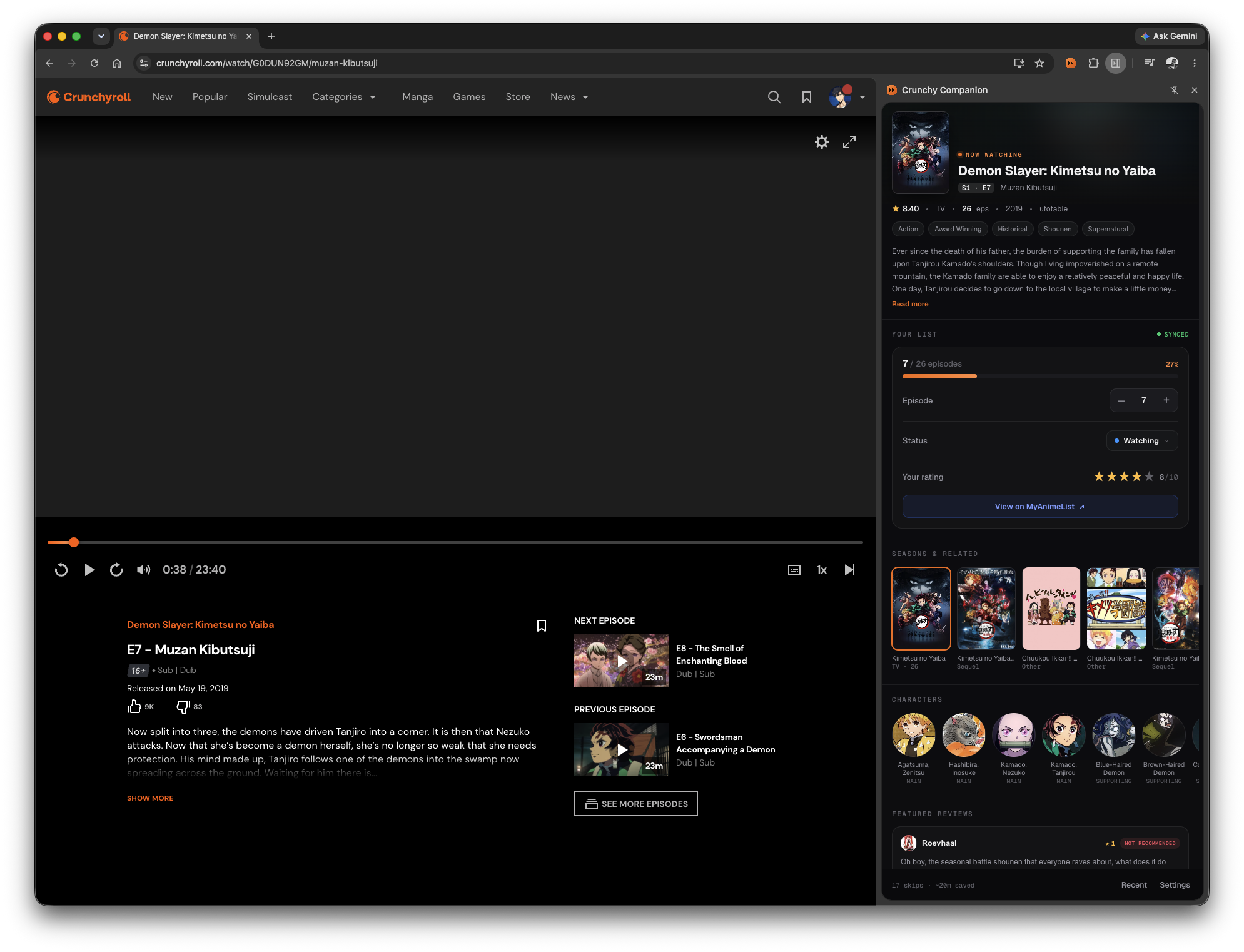
On Crunchyroll — the live show panel: now-playing hero, MyAnimeList sync, your episode/status/score, plus the show's synopsis, seasons, characters and reviews. |
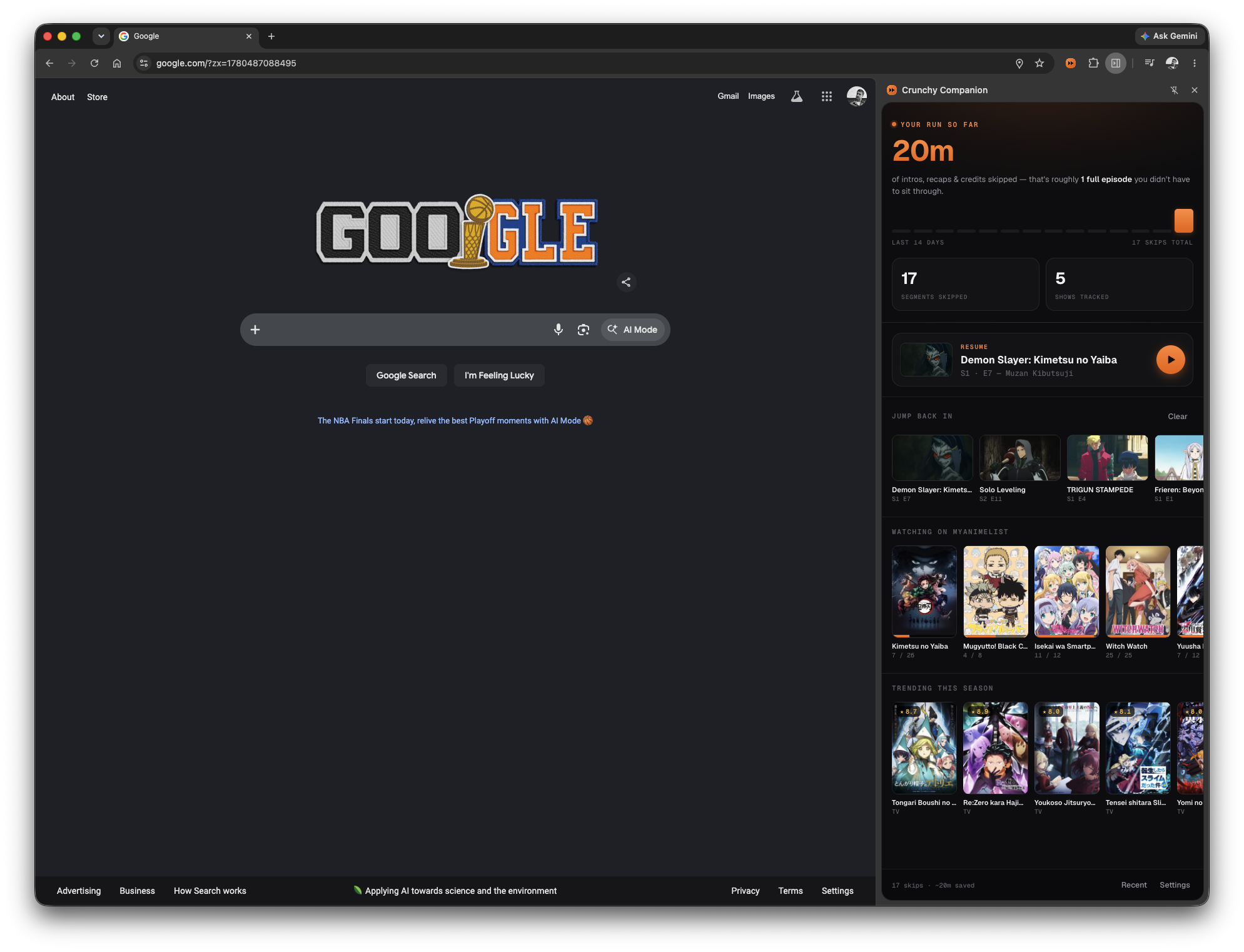
Anywhere else — the home dashboard: your skip stats and activity, a Resume card, Continue-watching, your MyAnimeList "watching" list, and what's trending this season. |
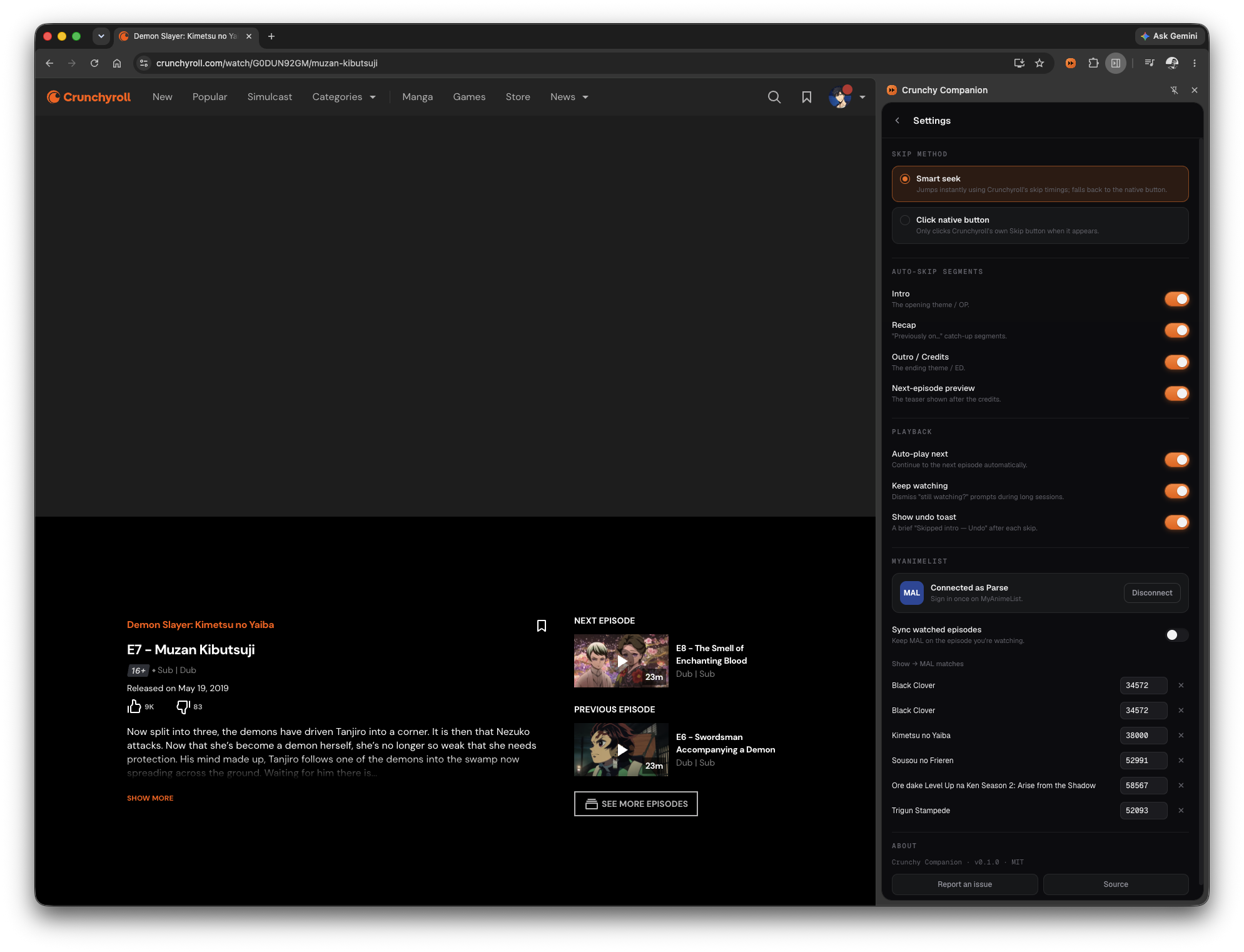
Settings — skip method, per-segment auto-skip toggles, playback options, and your MyAnimeList connection — all inline in the panel. |
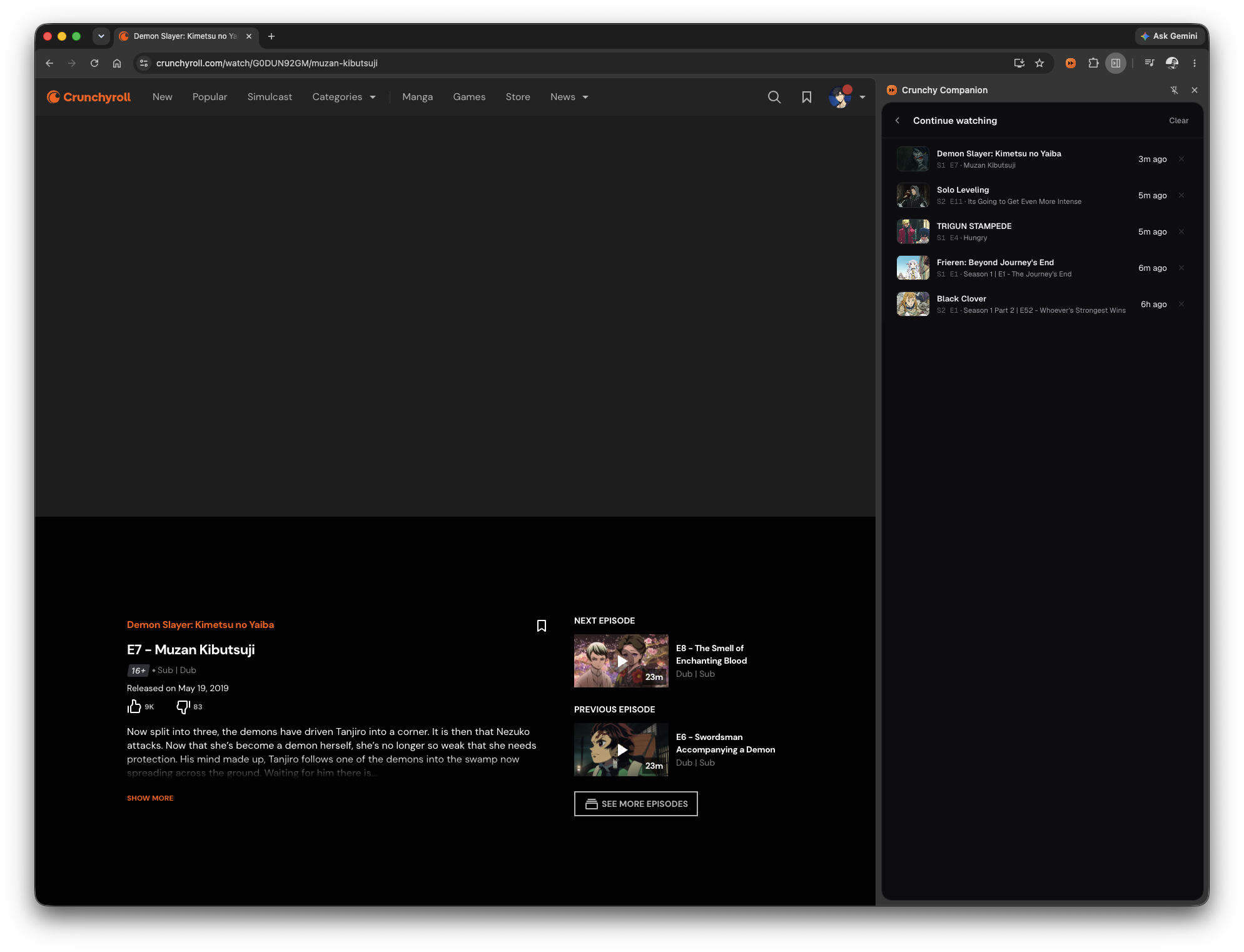
Continue watching — your recently opened episodes, with one-click resume and per-entry remove. |
- Auto-skip intro, recap, outro/credits, and the next-episode preview — each independently toggleable.
- Auto-play the next episode when one finishes.
- Keep watching: dismisses Crunchyroll’s “Are you still watching?” / profile prompts so a binge isn’t interrupted.
- MyAnimeList sync (opt-in): keeps your MAL progress on the episode you’re actually watching, with rich show details (synopsis, genres, seasons, characters, reviews) and inline controls to adjust episode / status / score.
- Continue watching: a Recent list of shows you’ve opened, with one-click resume and per-entry delete.
- A small “Skipped intro — Undo” toast so a skip never feels like a glitch, plus lifetime skip stats (time saved + an activity sparkline) on the home page.
- A persistent side panel and a full options page, with settings synced
across your signed-in browsers via
chrome.storage.sync.
This is a personal, client-side enhancement that only automates actions you can already perform yourself (clicking Skip / Next). It does not bypass paywalls, DRM, or advertising.
How skipping works
Crunchyroll publishes per-episode skip timings as static JSON — the same data that powers its own Skip Intro button:
https://static.crunchyroll.com/skip-events/production/{episodeId}.json
The extension supports two methods (Options → Skip method):
- Smart seek (default): the background worker fetches that JSON and the
content script seeks the
<video>straight past each enabled segment. If an episode has no published data, it falls back to clicking Crunchyroll’s native skip button. - Click native button: only ever clicks Crunchyroll’s own skip button.
Because Crunchyroll is a single-page app, the content script watches History API navigation (and polls as a safety net) and re-initialises for each new episode without a page reload.
MyAnimeList sync
Users open Options → MyAnimeList → Connect MyAnimeList, log into their own MAL account, and toggle Sync watched episodes on. Nothing else to set up.
- Tracks the episode you’re on. A short way into each episode (~30s of playback, enough to confirm you’re actually watching it) your MAL progress is set to that episode — so moving from episode 5 to 6 updates MAL to 6 rather than lagging a whole episode behind. Auto-sync only ever moves progress forward.
- Manual control in the panel. While on a watch page, the side panel shows a
MAL card: a
–/+(and type-to-set) episode stepper, status dropdown (Watching / Completed / …), a 1–10 star rating, and a link to the entry on MAL. - Accurate matching. The CR series is resolved to a MAL anime by scoring candidate titles (exact title and MAL alternative titles beat partial ones, the right season wins over other seasons, and full TV series beat shorts/spin-offs) — so e.g. “Black Clover” maps to the series, not the chibi short. A wrong match can be corrected under Series → MyAnimeList mappings; manual fixes are pinned and never auto-overridden.
Developer setup (one-time, to bake in the API client)
- At myanimelist.net/apiconfig → Create ID, set App Type = Other (a public client — no secret).
- Set App Redirect URL to exactly:
https://jcfmdllkakmjkihgphmmimhiehcbbfei.chromiumapp.org/(This ID is pinned by thekeyin the manifest, so it’s stable.) - Paste the generated Client ID into
src/shared/mal-config.ts(MAL_CLIENT_ID) and rebuild.
Auth is OAuth2 authorization-code + PKCE; tokens are stored locally and refreshed
automatically. The client ID is safe to ship (it’s not a secret in PKCE flows);
the signing key (mal-signing-key.pem) is gitignored.
Project layout
src/
├─ content/                # runs on the watch page (all frames)
│  ├─ index.ts             #   entry: wires the per-episode session together
│  ├─ navigation.ts        #   SPA episode-change detection (History API + poll)
│  ├─ player.ts            #   locate <video>, seek helper
│  ├─ meta.ts              #   scrape series/season/episode (JSON-LD, og:title)
│  ├─ skip-api.ts          #   ask the worker for skip-events data
│  ├─ skip-engine.ts       #   seek-mode auto-skip
│  ├─ dom-skip.ts          #   fallback: click the native skip button
│  ├─ autonext.ts          #   auto-play next episode
│  ├─ keep-watching.ts     #   dismiss "still watching?" / profile prompts
│  ├─ progress.ts          #   report the current episode to the tracker
│  └─ toast.ts             #   "Skipped X — Undo" overlay
├─ background/
│  └─ service-worker.ts    # skip-events fetch (avoids CORS) + MyAnimeList sync hub
├─ options/                # full settings page (fallback)
├─ sidepanel/              # the side panel: show view, home dashboard, settings,
│                          #   MAL card, rails (seasons/characters/reviews/trending)
├─ shared/                 # settings, messages, MAL client, tracker store,
│                          #   history, stats, runtime guards, types, parsers
└─ assets/icons/
scripts/
└─ build.mjs               # esbuild bundler + MV3 manifest generation → dist/
Build & load
npm install
npm run build    # type-checks (tsc --noEmit), then esbuild-bundles to dist/
Each entry is bundled as a single self-contained IIFE (no code-splitting, no
dynamic import()) and the content script is declared directly in the manifest.
This matters: Crunchyroll’s player runs in a cross-origin iframe
(static.crunchyroll.com/.../player.html) with a strict CSP, and a
dynamic-import-based content-script loader (e.g. @crxjs) gets blocked there — so
the skip code would never run where the video actually is. Manifest-declared
content scripts are injected by Chrome and bypass the page CSP.
Then in Chrome / Edge:
- Open
chrome://extensions. - Enable Developer mode (top-right).
- Click Load unpacked and select the
dist/folder. - Open any Crunchyroll
/watch/...episode.
After each rebuild, click the reload ↻ icon on the extension’s card in
chrome://extensionsso Chrome picks up the newdist/, then reload the Crunchyroll tab (content scripts aren’t re-injected into already-open tabs).
Click the toolbar icon to open the side panel (needs Chrome 114+); its Settings view covers everything, with the standalone options page as a fallback.
Verifying it works
- Open an episode with an intro → it should auto-skip, with a toast.
- Undo in the toast restores your position and won’t re-skip that segment.
- Let an episode reach the credits → outro skip and (if enabled) auto-next.
- Navigate to another episode without reloading → still works (SPA case).
- Toggle settings in the panel → they apply live, no reload needed.
- With MAL connected, a short way into an episode the panel’s MAL card (and your MAL list) should reflect the current episode.
- The watch-page DevTools console shows the content script’s activity; the
service worker (chrome://extensions → Inspect views: service worker)
shows skip-events fetches, any
404s (normal for episodes with no published data), andwatched: …lines tracing each MyAnimeList sync.
License
MIT