crunchyroll-companion
Crunchyroll Companion
An all-in-one enhancement extension for Crunchyroll
(Chrome / Edge, Manifest V3). The current version is the one in package.json;
the build stamps it into the manifest and the panel’s About section.
It lives in a persistent Chrome side panel that adapts to what you’re doing: a live show companion while you watch, and a home dashboard everywhere else.
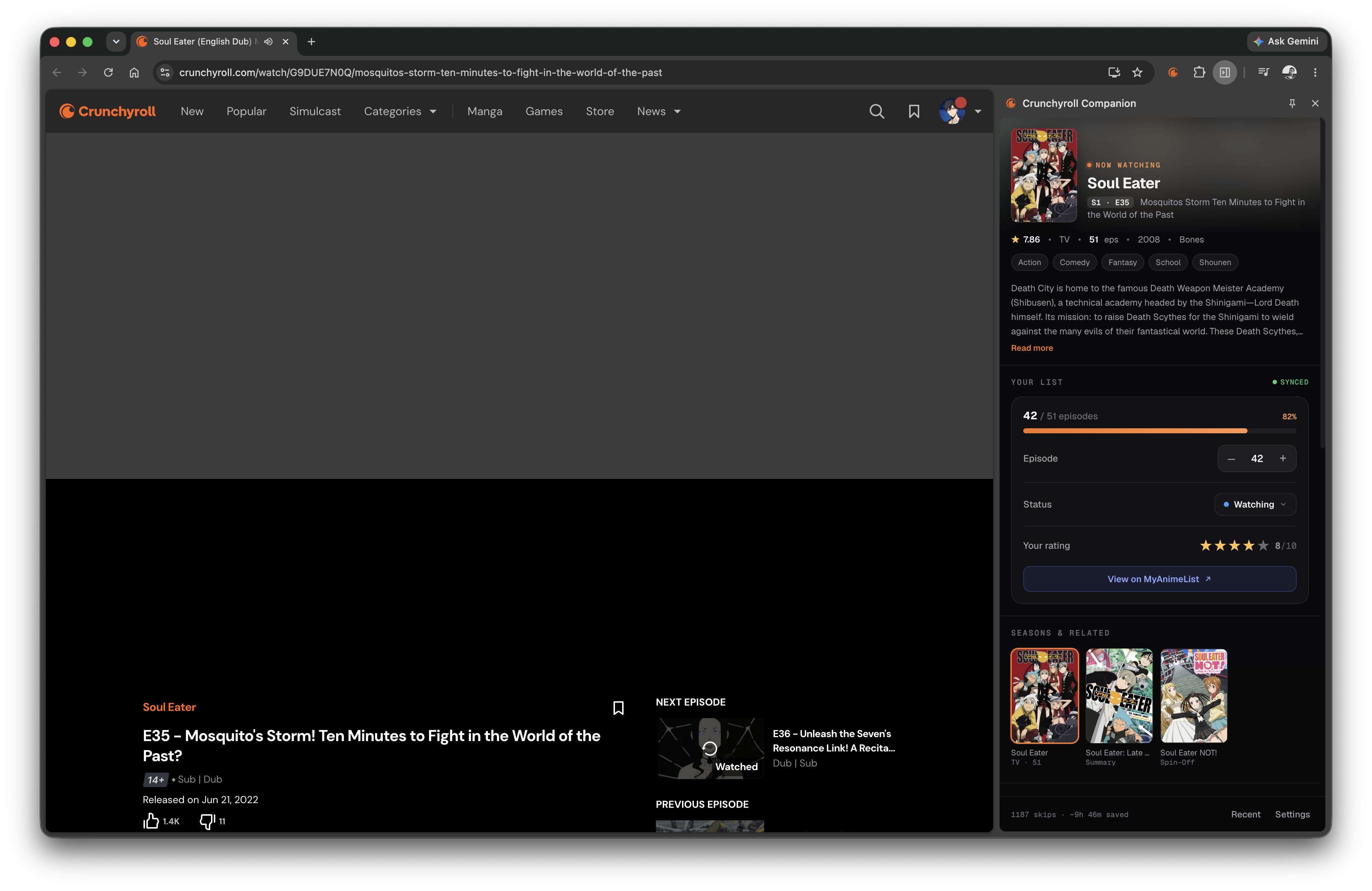
On Crunchyroll: the live show panel. Now-playing hero, a favorite toggle, MyAnimeList sync, your episode/status/score, plus the show's synopsis, seasons, characters, rankings, staff and trivia. |
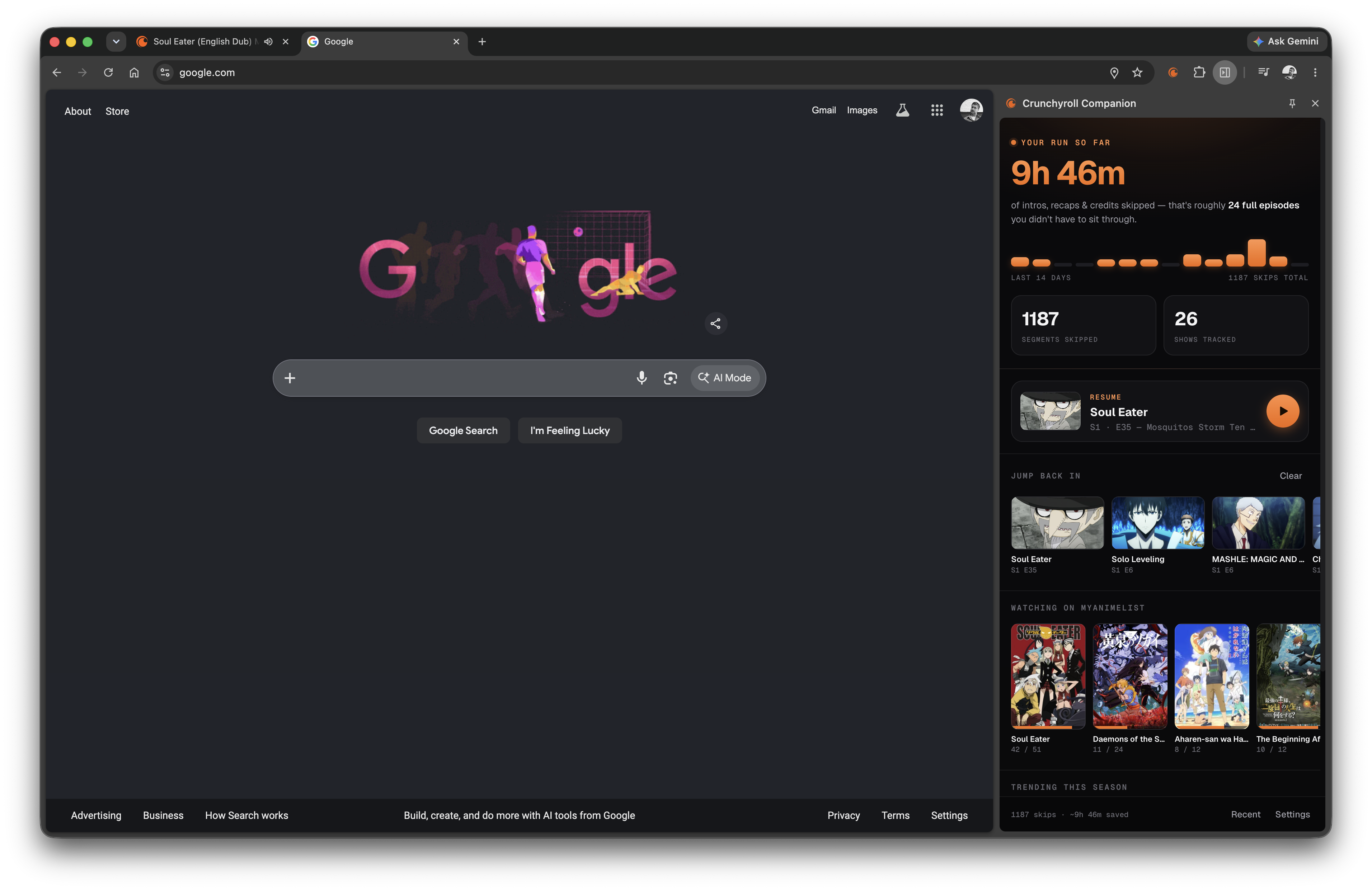
Anywhere else: the home dashboard. Your skip stats and activity, a Resume card, Favorites, Continue-watching, your MyAnimeList "watching" list, and what's trending this season. |
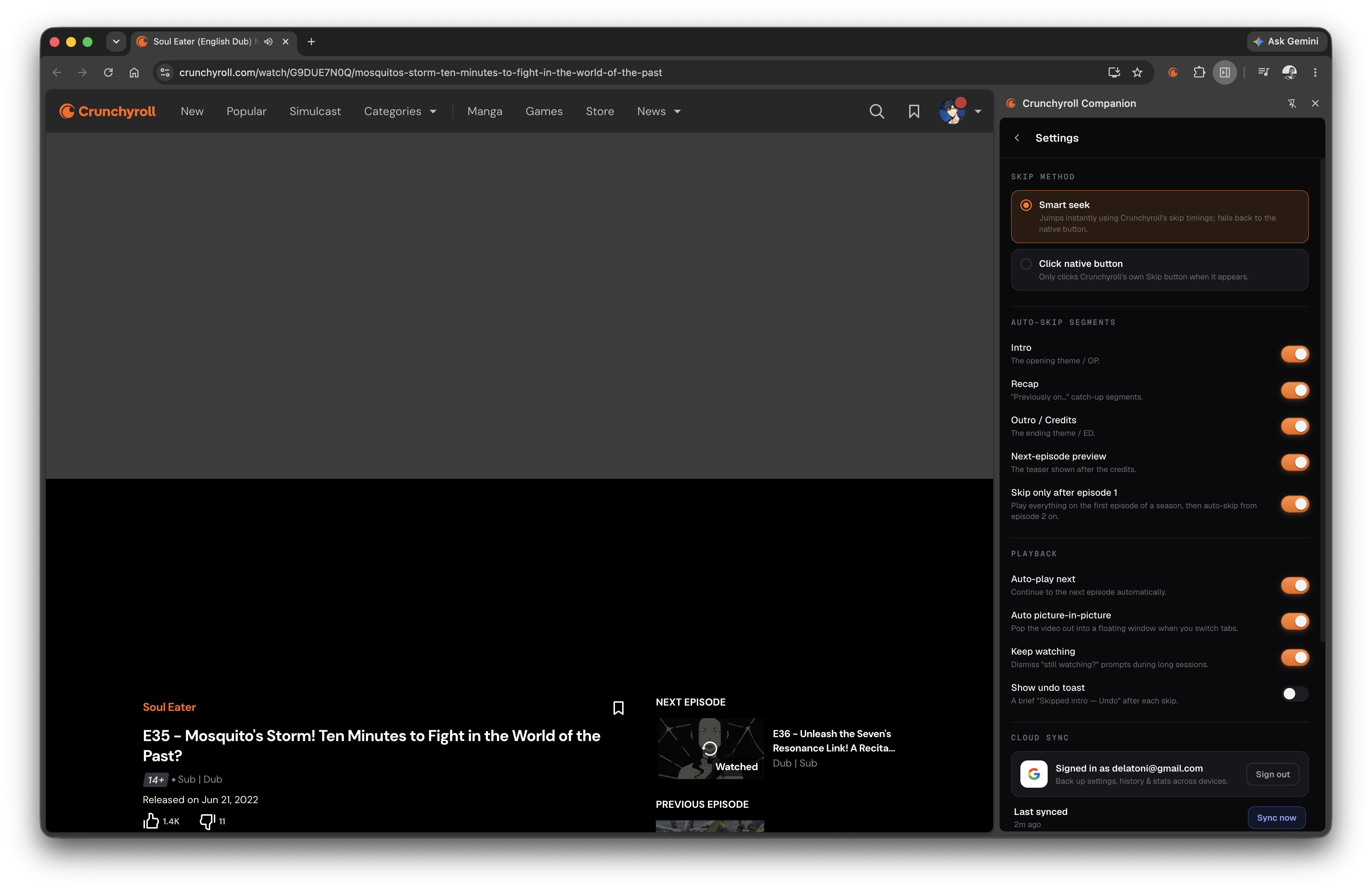
Settings: skip method, per-segment auto-skip toggles, playback options (auto-next, auto-PiP), cloud sync, and your MyAnimeList connection, all inline in the panel. |
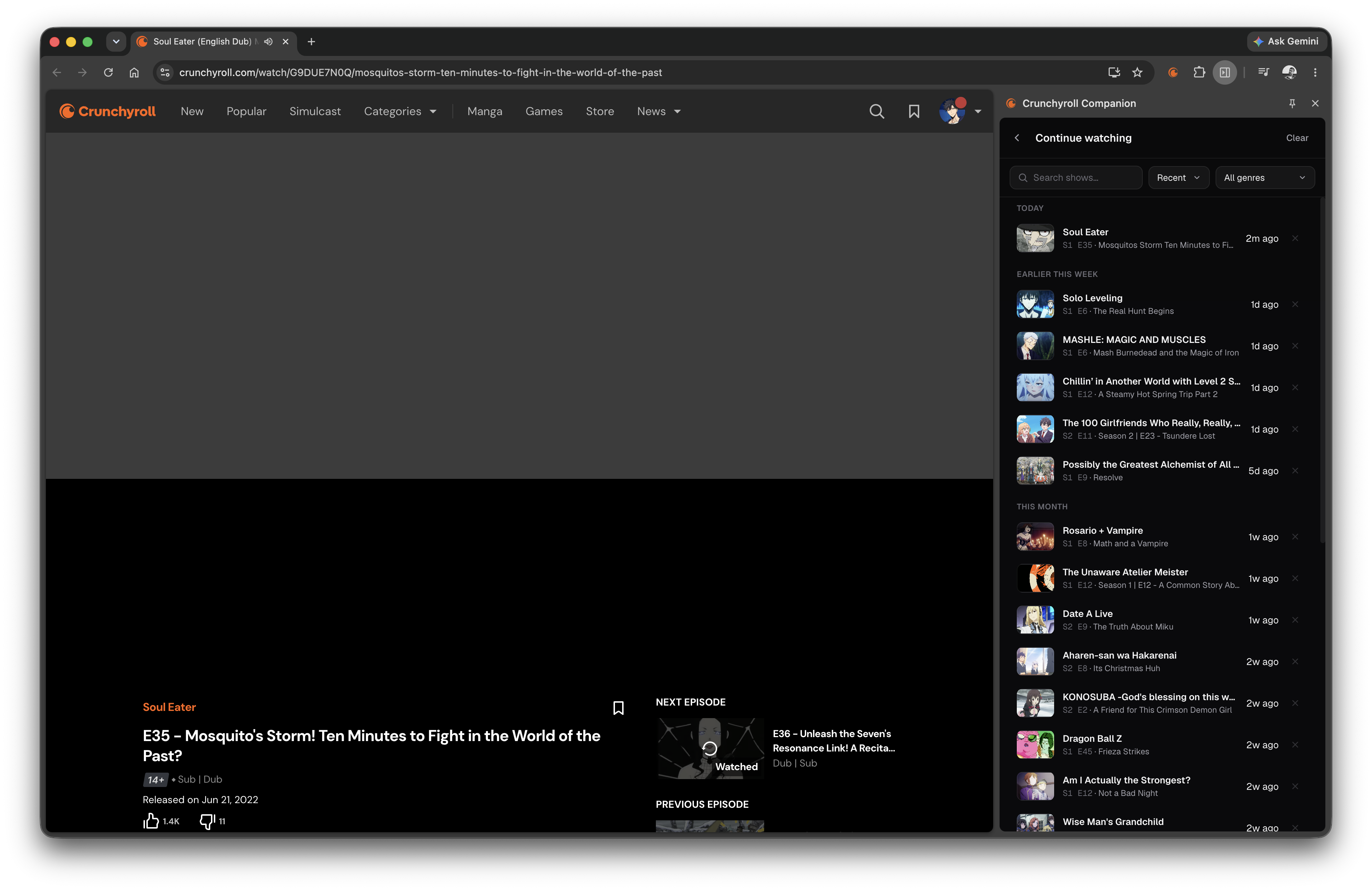
Continue watching: your recently opened episodes, with one-click resume, a favorite toggle, and per-entry remove. |
- Auto-skip intro, recap, outro/credits, and the next-episode preview, each independently toggleable, with an optional “skip only after episode 1” mode that lets a season’s first opening play and skips from episode 2 on.
- Auto-play the next episode when one finishes.
- Sleep timer 🌙 (moon icon in the panel footer): stop auto-play after 1–5 more episodes, enforced even if you use Crunchyroll’s own Autoplay setting.
- Keep watching: dismisses Crunchyroll’s “Are you still watching?” / profile prompts so a binge isn’t interrupted.
- Picture-in-Picture: a PiP button built into the player’s control bar, plus an optional auto-PiP that pops the video out into a floating window when you switch away from the tab.
- Favorites: bookmark a show from the watch page (the bookmark in the hero) or from the Continue-watching list. A favorite is the show, shown as its poster with its type and episode count: a Favorites rail on the home dashboard, plus a full Favorites list behind the bookmark icon in the footer (reachable from any view, searchable). Opening one resumes the last episode you watched of that show. Favorites sync across devices with cloud sync.
- MyAnimeList sync (opt-in): keeps your MAL progress on the episode you’re actually watching, with rich show details (synopsis, genres, seasons, characters, rankings, staff, trivia, next-episode air dates for airing shows) and inline controls to adjust episode / status / score. Finishing a series marks it Completed, with confetti 🎉, and a one-tap reconcile banner re-aligns Crunchyroll and MAL if they ever drift apart.
- Continue watching: a Recent list of shows you’ve opened (searchable, with a genre filter), one-click resume and per-entry delete.
- Discovery rails on the home dashboard: your MAL “watching” list, what’s trending this season, and “Because you watched…” recommendations seeded from your own history.
- A small “Skipped intro” toast with Undo so a skip never feels like a glitch, plus lifetime skip stats (time saved + an activity sparkline) on the home page.
- Cloud sync (opt-in): sign in with Google to back up your settings, watch history, favorites, skip stats, and MAL matches to your own Supabase, and keep them in sync across devices. Your MyAnimeList login stays device-local.
- A persistent side panel with everything inline, settings included, and
synced across your signed-in browsers via
chrome.storage.sync. Fonts are bundled, so the panel makes no runtime requests to Google.
This is a personal, client-side enhancement that only automates actions you can already perform yourself (clicking Skip / Next). It does not bypass paywalls, DRM, or advertising.
How skipping works
Crunchyroll publishes per-episode skip timings as static JSON, the same data that powers its own Skip Intro button:
https://static.crunchyroll.com/skip-events/production/{episodeId}.json
The extension supports two methods (Settings → Skip method):
- Smart seek (default): the background worker fetches that JSON and the
content script seeks the
<video>straight past each enabled segment. If an episode has no published data, it falls back to clicking Crunchyroll’s native skip button. - Click native button: only ever clicks Crunchyroll’s own skip button.
Because Crunchyroll is a single-page app, the content script watches History API navigation (and polls as a safety net) and re-initialises for each new episode without a page reload.
MyAnimeList sync
Users open the panel settings → MyAnimeList → Connect, log into their own MAL account, and toggle Sync watched episodes on. Nothing else to set up.
- Tracks the episode you’re on. A short way into each episode (~10s of real playback, enough to confirm you’re actually watching and not just clicking past) your MAL progress is set to that episode, so moving from episode 5 to 6 updates MAL to 6 rather than lagging a whole episode behind, and the panel’s count updates in place. Auto-sync only ever moves progress forward; reaching the finale marks the series Completed (rewatches are finalized properly).
- Manual control in the panel. While on a watch page, the side panel shows a
MAL card: a
–/+(and type-to-set) episode stepper, status dropdown (Watching / Completed / …), a 1–10 star rating, and a link to the entry on MAL. If Crunchyroll and MAL disagree by 2+ episodes, a banner offers a one-tap fix. - Accurate matching. The CR series is resolved to a MAL anime by scoring candidate titles (exact title and MAL alternative titles beat partial ones, the right season wins over other seasons, and full TV series beat shorts/spin-offs), so e.g. “Black Clover” maps to the series, not the chibi short. A wrong match can be corrected under Settings → Show → MAL matches by typing the right MAL id; manual fixes are pinned and never auto-overridden.
Characters, rankings and staff come from AniList’s public GraphQL API, looked up by MAL id, so the same match powers everything.
Developer setup (one-time, to bake in the API client)
- At myanimelist.net/apiconfig → Create ID, set App Type = Other (a public client, no secret).
- Set App Redirect URL to exactly:
https://jbmbolipkbppndjookmhmpceipfekhmi.chromiumapp.org/(The published extension’s ID; the dev build is pinned to the same ID via the manifestkeyinscripts/build.mjs, so one redirect covers dev + store.) - Paste the generated Client ID into
src/shared/mal-config.ts(MAL_CLIENT_ID) and rebuild.
Auth is OAuth2 authorization-code + PKCE; tokens are stored locally and refreshed
automatically. The client ID is safe to ship (it’s not a secret in PKCE flows);
the signing key (mal-signing-key.pem) is gitignored.
Cloud sync
Users open Cloud sync (in the side panel settings) → Sign in with Google, and their settings, watch history, favorites, skip stats, and MAL mappings are backed up and merged across devices. The MyAnimeList token is not synced; it stays on the device.
Sync is non-destructive, so two devices never clobber each other:
- settings: last-write-wins (the locally-edited side wins ties; the cloud applies on a fresh sign-in)
- history: union by series (newest episode per show)
- stats: max of each counter + per-day union
- mappings: union by key, with manual pins winning
- favorites: last write wins per show; un-favoriting leaves a short-lived tombstone so the removal reaches your other devices instead of being undone by the union
It runs on a 15-minute alarm, on startup, on a debounced local change, and on the
Sync now button. Each store is one JSON blob per user in a sync_blobs table,
scoped to the signed-in user by row-level security. A kind that fails to sync
(for example a table that doesn’t accept it yet) is reported in Settings and
retried next time without blocking the others.
Developer setup (one-time, to bake in the Supabase client)
-
In your Supabase project’s SQL editor, create the table + RLS policies:
create table if not exists public.sync_blobs (
  user_id    uuid        not null references auth.users(id) on delete cascade,
  kind       text        not null check (kind in ('settings','history','stats','mappings','favorites')),
  data       jsonb       not null default '{}'::jsonb,
  updated_at timestamptz not null default now(),
  primary key (user_id, kind)
);
alter table public.sync_blobs enable row level security;
create policy "own rows: select" on public.sync_blobs for select using (auth.uid() = user_id);
create policy "own rows: insert" on public.sync_blobs for insert with check (auth.uid() = user_id);
create policy "own rows: update" on public.sync_blobs for update using (auth.uid() = user_id) with check (auth.uid() = user_id);
create policy "own rows: delete" on public.sync_blobs for delete using (auth.uid() = user_id);
If the table already exists from a version before favorites, widen the
kindcheck instead:alter table public.sync_blobs drop constraint if exists sync_blobs_kind_check; alter table public.sync_blobs add constraint sync_blobs_kind_check check (kind in ('settings','history','stats','mappings','favorites')); - Authentication → Providers → Google: enable it and add a Google OAuth
client ID + secret (Google Cloud Console redirect URI:
https://<project-ref>.supabase.co/auth/v1/callback). - Authentication → URL Configuration → Redirect URLs: add the extension’s
origin (dev and store installs share it, since the manifest
keypins the unpacked build to the published ID):https://jbmbolipkbppndjookmhmpceipfekhmi.chromiumapp.org/ - Paste the Project URL and anon key into
src/shared/supabase-config.ts, and add the project origin tohost_permissionsinscripts/build.mjs, then rebuild.
Sign-in uses Google OAuth via chrome.identity.launchWebAuthFlow with the PKCE
flow (S256, so tokens never ride the redirect URL); the session is stored locally
and refreshed automatically. The anon key is safe to ship: it’s public by design
and guarded by the RLS above.
Project layout
src/
├─ content/                # runs on the watch page (all frames)
│  ├─ index.ts             #   entry: wires the per-episode session together
│  ├─ navigation.ts        #   SPA episode-change detection (History API + poll)
│  ├─ player.ts            #   locate <video>, seek helper
│  ├─ meta.ts              #   scrape series/season/episode (JSON-LD, og:title)
│  ├─ skip-api.ts          #   ask the worker for skip-events data
│  ├─ skip-engine.ts       #   seek-mode auto-skip
│  ├─ dom-skip.ts          #   fallback: click the native skip button
│  ├─ autonext.ts          #   auto-play next episode
│  ├─ keep-watching.ts     #   dismiss "still watching?" / profile prompts
│  ├─ auto-pip.ts          #   auto Picture-in-Picture on tab switch
│  ├─ pip-button.ts        #   PiP button injected into the player control bar
│  ├─ pip-enable.ts        #   clear Crunchyroll's disablePictureInPicture flag
│  ├─ progress.ts          #   report the current episode to the tracker
│  └─ toast.ts             #   "Skipped X" + Undo overlay
├─ background/
│  └─ service-worker.ts    # skip-events fetch (avoids CORS) + MAL sync + cloud sync
├─ sidepanel/              # the side panel, one module per view:
│  ├─ sidepanel.ts         #   shell: view switching, tab tracking, live updates
│  ├─ watching.ts          #   show view: hero + favorite, MAL card, reconcile, rails
│  ├─ home.ts              #   home dashboard: stats, resume, favorites, discovery
│  ├─ settings-view.ts     #   settings slide-over (skip/playback/MAL/cloud sync)
│  ├─ recent.ts            #   continue-watching overlay (search/sort/genre/favorite)
│  ├─ sleep-dock.ts        #   sleep-timer dock behind the footer moon
│  └─ helpers.ts           #   DOM + rail helpers shared by the views
├─ shared/                 # settings, messages, MAL client + title matcher,
│                          #   tracker store, history, favorites, stats, sleep
│                          #   timer, broadcast math, Supabase client + sync engine
└─ assets/                 # icons + bundled fonts
scripts/
├─ build.mjs               # esbuild bundler + MV3 manifest generation → dist/
└─ package.mjs             # stage dist/ into a Chrome Web Store upload zip
tests/                     # vitest suites for the pure logic (parsers, matcher,
                           #   sync merges, broadcast math) plus a copy-style
                           #   guard; run in CI
Build & load
npm install
npm run build    # type-checks (tsc --noEmit), then esbuild-bundles to dist/
npm run check    # typecheck + lint (eslint, incl. no-unsanitized) + tests + build
npm test         # vitest only
npm run package  # build + Chrome Web Store zip (manifest key stripped)
CI (GitHub Actions) runs typecheck, lint, tests, and the build on every push/PR.
Production bundles are minified with console.* stripped; build with DEBUG=1
for readable output and logging.
Each entry is bundled as a single self-contained IIFE (no code-splitting, no
dynamic import()) and the content script is declared directly in the manifest.
This matters: Crunchyroll’s player runs in a cross-origin iframe
(static.crunchyroll.com/.../player.html) with a strict CSP, and a
dynamic-import-based content-script loader (e.g. @crxjs) gets blocked there, so
the skip code would never run where the video actually is. Manifest-declared
content scripts are injected by Chrome and bypass the page CSP.
Then in Chrome / Edge:
- Open
chrome://extensions. - Enable Developer mode (top-right).
- Click Load unpacked and select the
dist/folder. - Open any Crunchyroll
/watch/...episode.